How to Choose Accounting & ERP Software
Selecting the right Accounting & ERP Software is an important decision for businesses of all sizes. Financial management, inventory tracking, purchasing, reporting, and operational planning often depend on the software a company uses every day.
A well-planned selection process can help organizations improve efficiency, maintain accurate records, and support future growth.
With many options available, choosing a suitable platform requires careful evaluation of business needs, functionality, scalability, and long-term usability. Understanding the key factors involved can make the decision easier and more effective.
Understanding Accounting and ERP Software
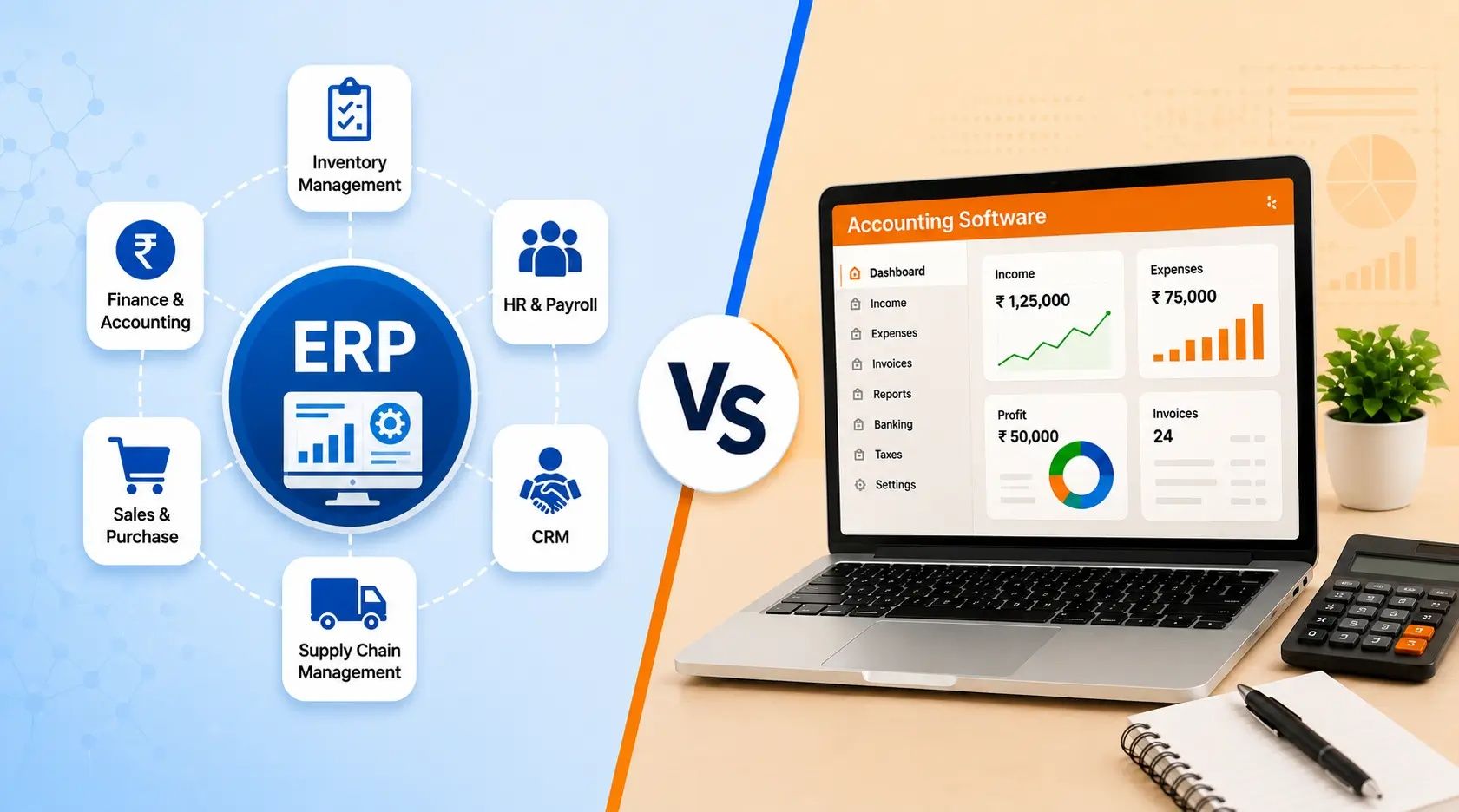
Accounting software focuses primarily on financial management activities such as:
Bookkeeping
Accounts payable
Accounts receivable
Financial reporting
Tax management
Budget tracking
ERP (Enterprise Resource Planning) software goes further by integrating multiple business functions into a single system. In addition to accounting features, ERP platforms may include:
Inventory management
Supply chain management
Procurement
Manufacturing tracking
Human resources
Customer relationship management
Project management
Businesses should first determine whether basic accounting software meets their requirements or whether a broader ERP solution is necessary.
Identify Business Requirements
Before reviewing software options, organizations should clearly define their needs.
Consider questions such as:
How many users will access the system?
What financial processes need improvement?
Is inventory management required?
Are multiple business locations involved?
Does the company need advanced reporting?
Are there industry-specific requirements?
Creating a list of current challenges and future goals helps narrow the available choices and prevents selecting software with unnecessary features.
Evaluate Scalability
Business needs often change over time. Software that works today may not meet future requirements if growth occurs.
When evaluating solutions, consider:
User expansion capabilities
Additional modules availability
Increased transaction handling
Multi-location support
Multi-currency functionality
International compliance features
A scalable platform can accommodate growth without requiring a complete system replacement later.
Review Core Accounting Features
Strong accounting functionality remains essential even within a comprehensive ERP platform.
Important features include:
General Ledger Management
The general ledger serves as the foundation of financial reporting. Ensure the software supports flexible account structures and accurate transaction recording.
Accounts Payable and Receivable
The system should efficiently manage vendor payments and customer invoices while maintaining accurate records.
Financial Reporting
Look for software that generates reports such as:
Balance sheets
Profit and loss statements
Cash flow reports
Expense summaries
Revenue analysis
Accessible reporting helps management monitor financial performance more effectively.
Assess Industry-Specific Needs
Different industries often have unique operational requirements.
For example:
Manufacturing organizations may require production planning tools.
Retail businesses may need inventory and point-of-sale integration.
Construction companies often benefit from project accounting features.
Healthcare organizations may require compliance-focused reporting.
Industry-specific capabilities can reduce the need for external systems and manual workarounds.
Consider Ease of Use
Software adoption is often influenced by user experience.
A system should provide:
Clear navigation
Simple workflows
Logical menu structures
Accessible dashboards
Easy report generation
Complex systems can increase training requirements and reduce productivity during implementation.
Requesting demonstrations and testing trial environments can help assess usability before making a decision.
Examine Integration Capabilities
Businesses commonly use multiple software tools.
Accounting and ERP systems may need to connect with:
Banking platforms
Payroll applications
E-commerce systems
Customer management tools
Inventory platforms
Business intelligence solutions
Strong integration capabilities help reduce duplicate data entry and improve information consistency across departments.
Analyze Reporting and Analytics
Modern organizations rely on data-driven decision-making.
Reporting capabilities should allow users to:
Monitor financial performance
Track operational metrics
Identify trends
Compare historical data
Create custom reports
Real-time dashboards and analytics tools can provide valuable insights for management teams.
Evaluate Security Features
Financial and operational data requires strong protection.
Review security features such as:
User access controls
Role-based permissions
Data encryption
Audit trails
Backup capabilities
Multi-factor authentication
Security measures help protect sensitive information and support regulatory compliance.
Check Cloud and Deployment Options
Many software providers now offer cloud-based solutions alongside traditional on-premises installations.
Cloud-Based Systems
Advantages may include:
Remote access
Automatic updates
Reduced infrastructure requirements
Easier collaboration
On-Premises Systems
Potential benefits include:
Greater infrastructure control
Internal data management
Custom configuration flexibility
The appropriate choice depends on organizational requirements, resources, and technology preferences.
Review Implementation Requirements
Implementation complexity varies significantly between platforms.
Evaluate factors such as:
Data migration requirements
User training needs
Configuration effort
Timeline expectations
Internal resource availability
A realistic implementation plan helps reduce disruptions during the transition process.
Consider Vendor Support and Updates
Software continues to evolve after implementation.
Review:
Product update frequency
Documentation quality
Training resources
Technical assistance availability
User community activity
Reliable ongoing support contributes to long-term software success.
Compare Total Ownership Considerations
While pricing is important, organizations should evaluate overall ownership considerations rather than focusing solely on initial expenses.
Factors may include:
Subscription fees
Maintenance requirements
Training investments
Implementation effort
Additional module requirements
Infrastructure needs
A comprehensive evaluation provides a clearer understanding of long-term value.
Create a Shortlist and Test Solutions
After identifying requirements, narrow the options to a manageable shortlist.
During evaluation:
Schedule product demonstrations.
Test real business scenarios.
Review reporting capabilities.
Assess user experience.
Evaluate integration options.
Gather feedback from key stakeholders.
Practical testing often reveals strengths and limitations that may not be apparent from marketing materials alone.
Final Thoughts
Choosing Accounting & ERP Software requires careful planning and evaluation. Businesses should focus on operational needs, financial management requirements, scalability, security, reporting capabilities, and ease of use. A structured selection process helps organizations identify software that aligns with both current operations and future objectives.
By clearly defining requirements and thoroughly evaluating available options, businesses can make informed decisions that support efficiency, accuracy, and sustainable growth over time.